Facebook Feed Personalization: A Topic Audit Checklist For Pages
· 9 min read
A practical checklist to tighten Facebook topic consistency and audit recent posts for Feed and Reels personalization and three-dot menu feedback.
A Practical Audit To Match Feed And Reels Interests People Add In Your Algorithm
If your Facebook Page feels like it has inconsistent reach, one common cause is content that drifts across too many themes. Meta has made that risk more real by adding more ways for people to tell Facebook what they want to see, directly inside Feed and Reels.
On October 13, 2026, Meta said it is rolling out “Your algorithm,” where people can “directly add and manage the topics you want to see in Feed and Reels.” For Page managers, the practical takeaway is simple: tighten topic consistency so your posts are easier for the system to understand and easier for the right people to reinforce through feedback controls.
Below is a working checklist you can use to clean up the last 30 to 90 days of content and rebuild your plan around a few clear topic lanes.
What Meta Announced And Where People Use It
Meta’s Newsroom post titled “Your Algorithm, Your Words: New Ways to Shape What You See on Facebook” says it is “introducing new AI-powered tools that help you shape what you see in Feed and Reels by telling us what you’re interested in, in your own words.” It also says: “We’re rolling out Your algorithm, where you can directly add and manage the topics you want to see in Feed and Reels.”
Meta points people to the same interaction layer that already shapes distribution decisions: the three-dot menu. The post says: “You can find it in the three-dot menu,” and adds that Meta “updated the three-dot menu on every post to make it easier to access these new customization tools.”
Meta also describes a more detailed feedback loop: “After clicking ‘Interested’ or ‘Not interested,’ we may ask follow up questions for more detail on what you liked or disliked. You can easily tell us, in your own words, what you want to see more or less of, and your recommendations will update in real time.” For Page managers, that means your audience can now send very direct signals about what their interests are, and those signals can adapt “within the same session,” as Meta describes when it explains how LLMs can incorporate “interests, context, and intent behind natural language.”
The Practical Shift For Page Managers
“Your algorithm” adds a new personalization surface that is explicitly about topics people want to see. You can plan around something you control: making your Page’s content easy to categorize as a topic by both people and systems.
Why Topic Consistency Now Has More Weight
Meta’s Newsroom post “How AI Influences What You See on Facebook and Instagram” explains that ranking uses “a wide variety of predictions in combination,” including predictions “based on behavior” and “based on user feedback received through surveys.” It also reinforces that user controls exist, including that you can access Feed Preferences “through the three-dot menu on relevant posts, as well as through Settings.”
For Pages, the second-order implication is about training signals. Meta’s October 13, 2026 post describes recommendations updating “in real time,” and follow-up questions collecting freeform text “in your own words.” When your posts are tightly about one subject, positive feedback has a clearer target. When your posts are broad or mixed, the feedback can get noisy. That noise may show up quickly, because Meta says recommendations can adapt within the same session.
What Content Controls Are Already Doing
Meta has repeatedly described “Show more” and “Show less” style controls as a way people shape what they see. In “New Ways to Customize Your Facebook Feed,” Meta states: “At launch, Interested and Not interested were called Show more and Show less, but their names have since changed.” The same post describes how “Show more” and “Show less” work at the recommendation level, saying they would “temporarily increase” or “temporarily decrease” a ranking score for “that post and posts like it.”
Meta’s “New Ways to Discover and Personalize Facebook Reels” makes the Reels behavior even more concrete: selecting Show More “will temporarily increase its ranking score and for reels like it,” and selecting Show Less “will temporarily decrease its ranking score.” The operational takeaway is that consistency increases the chance that “posts like it” includes your future posts, instead of a random set that happened to share one surface feature.
Checklist: Tighten Topic Consistency Across Posts
1) Decide Your Page’s Topic Promise In Plain Words
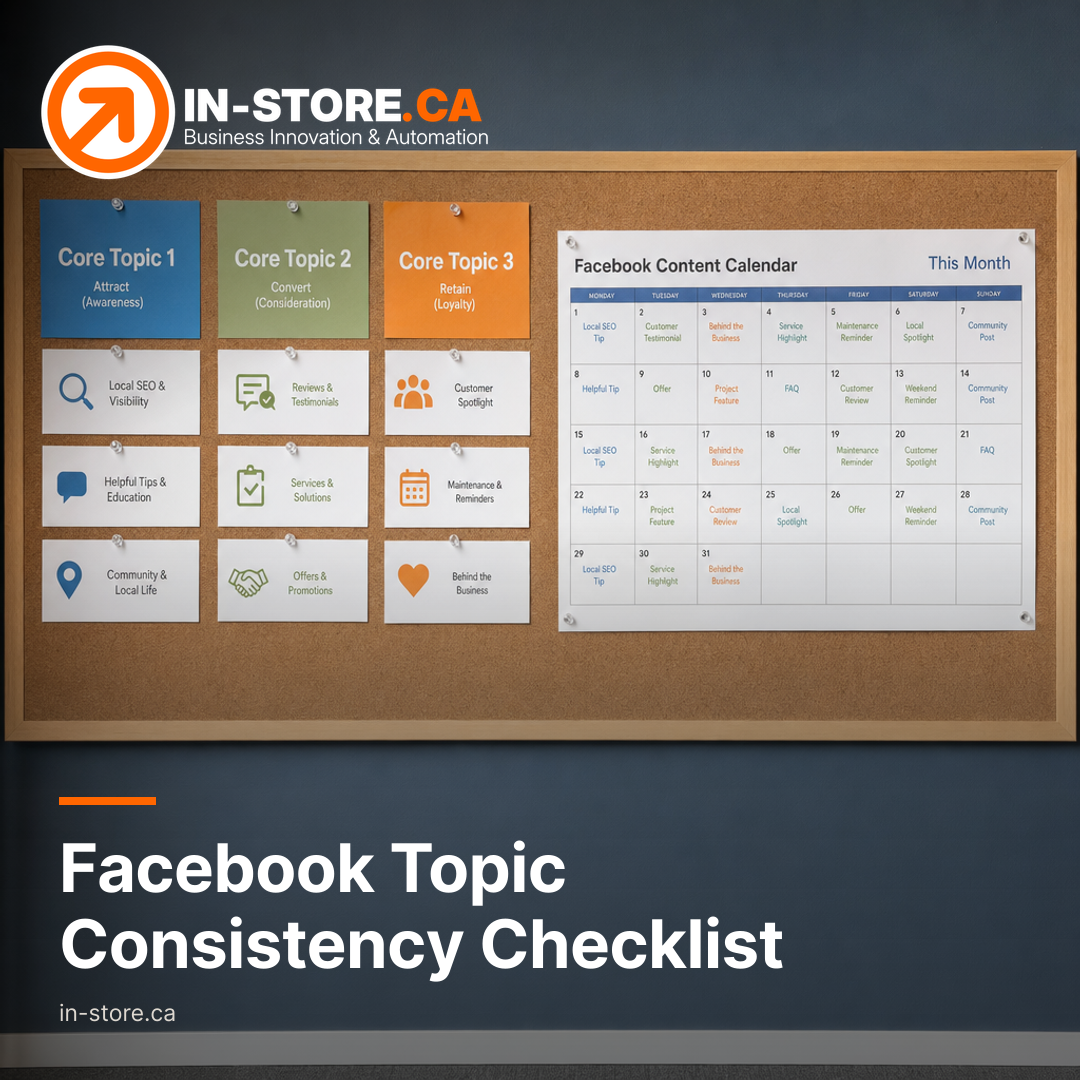
Because Meta frames “Your algorithm” as managing “topics you want to see,” start by setting 1 to 3 core topics for your Page. Keep them simple and written in everyday language. Then write a one-sentence version of your Page topic in the same spirit Meta uses, “in your own words.” Use that sentence as your internal filter for what gets posted.
2) Make Each Post Clearly About One Primary Topic
For every post, confirm there is a single primary topic. Then ensure the first lines make that topic obvious, because people are making fast decisions in Feed and Reels, and Meta says follow-up prompts may kick in after someone chooses “Interested” or “Not interested.” If the opening is vague, you increase the odds that the wrong people interact, or that the right people scroll because they cannot tell what it is quickly.
3) Plan Content Clusters That Invite Reinforcement
Build series content, meaning recurring formats around the same subject, so that when the right person clicks “Interested,” the system has a better shot at treating future installments as “posts like it.” Meta’s language about ranking score changes applying to “posts like it” appears both in its Feed customization post and its Reels personalization post.
Give each cluster consistent framing and keywords. Meta’s October 13, 2026 post explicitly connects freeform text to personalization, describing “bringing freeform text together with everything we already understand about what you enjoy.” Your job is to make it easy for a person to describe your topic and for your next post to match that description.
4) Remove Triggers That Create Quick “Not Interested” Decisions
Meta says people can click “Not interested,” and it may ask follow-up questions, with recommendations updating “in real time.” For Page managers, this is a QA job as much as it is a creative job. Scan for patterns that attract the wrong audience and then repel them, such as broad hooks that do not match the actual topic, misleading thumbnails or titles in video and Reels, and posts that switch topics midstream.
Checklist: Audit Recent Content Against The Interests People Select
1) Build A Simple Inventory Of Your Last Set Of Posts
Create a working list of your recent content and label each item with an intended topic. Meta’s October 13, 2026 post focuses on “Feed and Reels,” so keep your labels usable across those formats.
- Post URL or internal identifier
- Format (Feed post, video, Reel, using your own internal labels)
- Intended topic (one of your core topics)
- Optional secondary topic
- A “topic clarity” score, meaning how quickly a person can tell what this is about
- A plain-language “audience-fit” guess, describing the audience interest this serves
2) Run A Hard “Topic Consistency” Pass
For each post, mark it as a fail if it does not map cleanly to one of your core topics, or if it mixes unrelated topics. Meta’s new surface describes people “add and manage the topics you want to see,” so mixed-topic posts create friction for both audience signaling and system interpretation.
Also flag inconsistent terminology. When the same idea is called three different things across a month, it becomes harder for your future posts to match what a person described in follow-up prompts “in your own words.”
3) Identify Posts Likely To Train The Wrong Interests
Meta’s “How AI Influences What You See on Facebook and Instagram” explains that ranking is based on many predictions, including ones based on behavior. The October 13, 2026 post reinforces that feedback can update recommendations quickly. Look for posts that generated engagement but sit outside your core topics. Those posts can create a mismatch between the audience you want and the interests your Page appears to serve based on engagement patterns.
4) Rebuild Your Plan As Topic Lanes
Assign each upcoming post to a core topic lane. Then standardize how you open content so the topic is clear immediately. This ties directly to Meta’s theme: “tell Facebook… what you want to see… and your recommendations respond right away.” Your Page’s job is to make it obvious what each post should be classified as, both by a person using the three-dot menu and by the ranking system reacting to their feedback.
5) Add A Real-World QA Step: Check The Three-Dot Menu Context
Meta repeatedly places these controls in the three-dot menu and says it updated the menu “on every post.” Build a QA habit: review your own recent posts as a normal viewer would see them in Feed and Reels, and note what kind of post context could push the right person toward “Interested,” or the wrong person toward “Not interested.”
How IN-STORE Would Operationalize This For A Busy Team
This kind of topic consistency work is less about writing better captions and more about building a repeatable system. IN-STORE typically treats it as two connected jobs: audience research (to decide the 1 to 3 topic lanes that match what your customers actually care about) and an execution workflow (so every post is reviewed against the same topic promise before it goes live).
If you are running lean, the simplest starting point is to pick your core topics, write your one-sentence “in your own words” topic promise, then run the inventory and fail pass on your recent posts. The output is a cleaner forward plan that is easier for your audience to reinforce through Facebook’s three-dot menu controls.
Meta’s “Your algorithm” direction makes one discipline pay off more often for Page managers: making every post unambiguously about a small set of topics your audience would actually choose. Once your last set of posts is labeled and scored, your next content plan becomes simpler to manage and easier for people to reinforce through “Interested” and “Not interested.”
If you want help turning this into a managed workflow, explore IN-STORE’s AI-Assisted Content Marketing and Audience Research services.
Need help operationalizing this audit? Contact IN-STORE to get started: Explore IN-STORE services.
Sources: