Your cabinet is paused for a moment
From time to time our team switches the cabinet into maintenance while we ship an improvement or fix something. While it is on, the cabinet shows a short notice instead of your usual pages. It applies to every client at the same time, and it can appear while you are already signed in.
What you will see
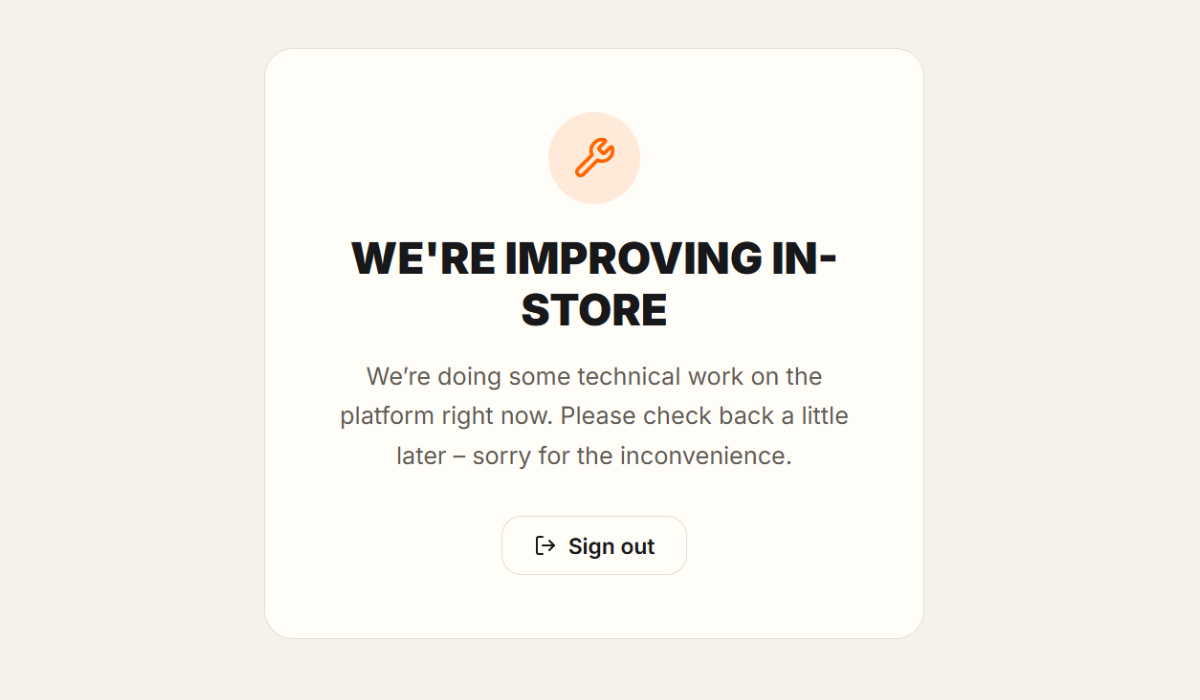
A card titled "We're improving IN-STORE", usually with the message "We're doing some technical work on the platform right now. Please check back a little later – sorry for the inconvenience." Sometimes our team adds a short note of its own instead. The only button is "Sign out".
Our public website and this Help Centre stay available during maintenance.
What to do
Nothing. Maintenance is always temporary, and your account and everything you have saved are safe. You do not even need to reload: the cabinet checks every 30 seconds and opens again by itself as soon as the work is finished.
If maintenance starts while you are filling in your intake, answers that were already saved stay saved. When the cabinet opens again, check the last question you were working on.
Taking unusually long?
If the cabinet stays in maintenance much longer than you would expect, contact us and we will give you an update.